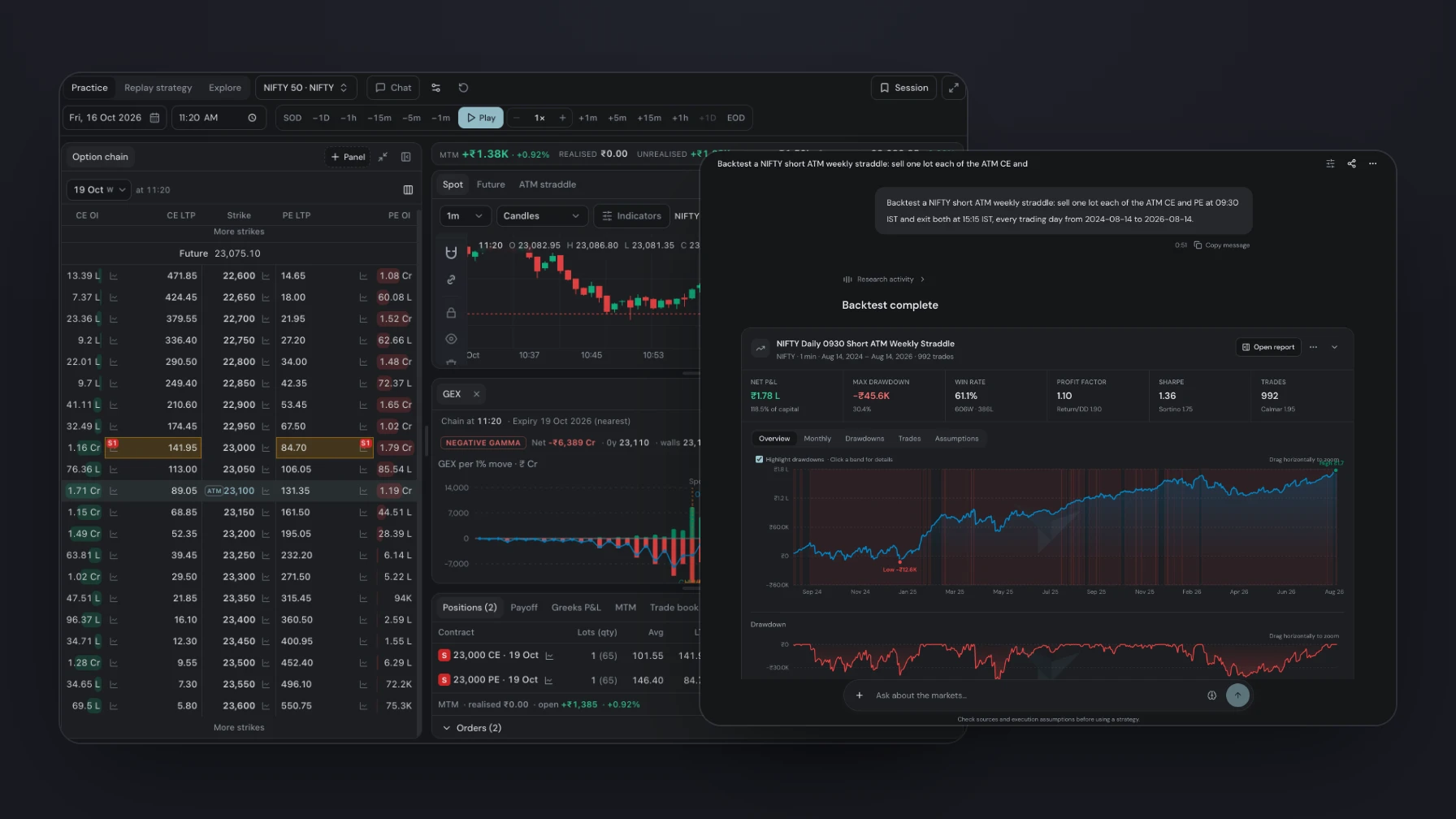
This release brings a new Simulator, a public market calendar, tradebook backtests on real options and futures, quantity scaling in reports and a clearer, contract-based DTE. Chat is now open on every plan, you can sign in with a password, and chat answers with the data itself: reports, charts and option chains appear right in the conversation.
Here is what is new.
1. Chat with your market data, on every plan
Volrix Chat, My strategy and AI top-ups are now available on every plan, including Free.
Answers no longer stop at text. Ask for a backtest and the full report card appears in the conversation, with net P&L, drawdown, win rate, Sharpe and the equity curve. Charts with indicators, option chains with GEX, and backtest trades plotted on the price chart appear the same way, and a backtest's trades can be replayed in the Simulator straight from the chat.
Backtest a NIFTY short ATM weekly straddle: sell one lot each of the ATM CE and PE at 09:30 IST and exit both at 15:15 IST, every trading day for the last two years.
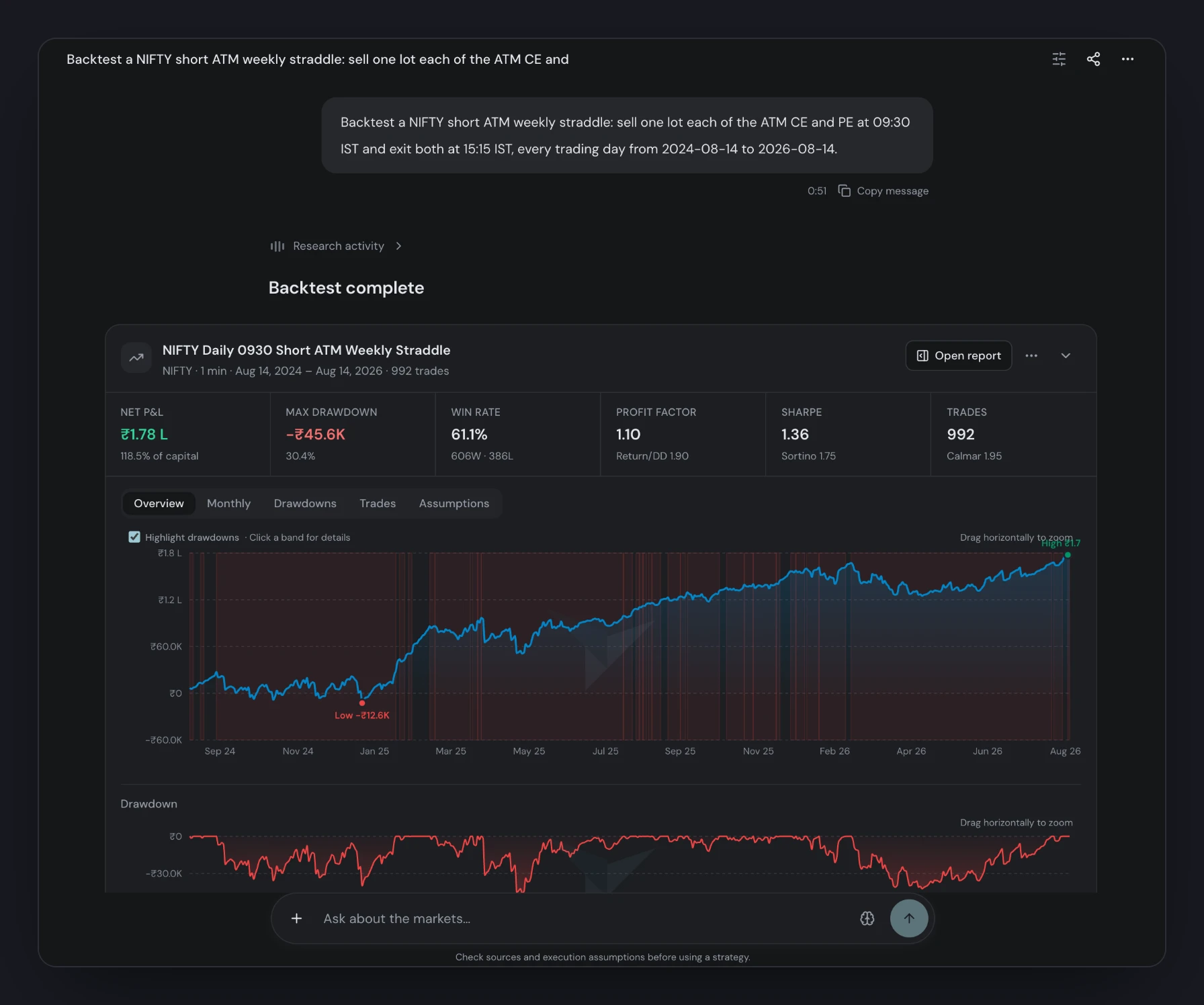
The question, the answer and the report in one conversation.
2. Sign in with email and password
Alongside Google, FYERS, Arrow and Pocketful, you can now sign in with your email and a password.
- Set it once. Open Settings → Profile → Password and choose a password of 12 to 128 characters.
- Use it anywhere. Sign in on the web, or when connecting Claude, ChatGPT and other MCP apps to Volrix.
- Stay in control. When you change it, you can sign out every other browser and MCP connection in the same step.
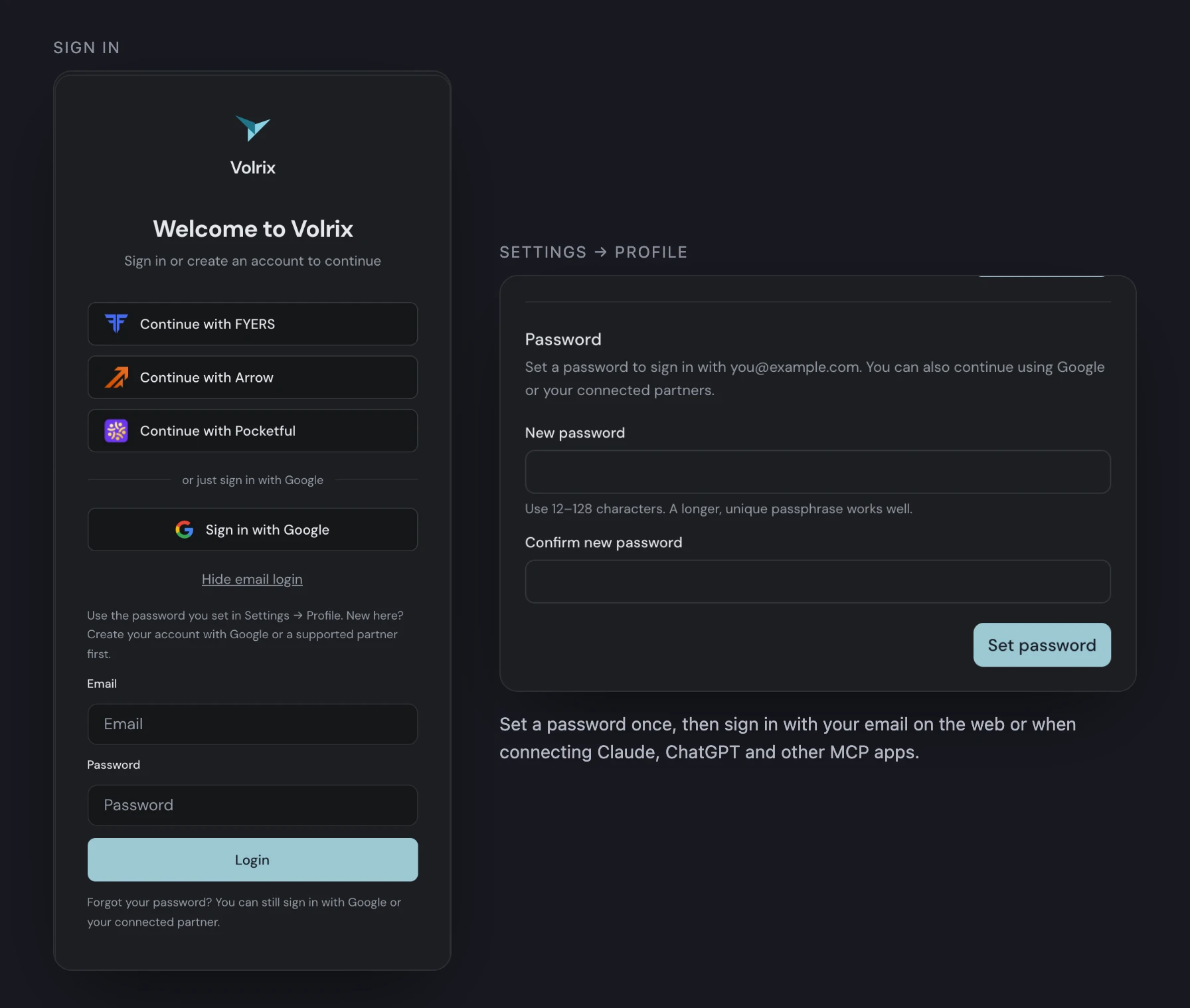
Your partner and Google sign-ins keep working alongside your password.
3. Simulator (beta): trade any idea, minute by minute
The Simulator replays a past session one minute at a time. Pick a symbol and a date, then step forward by a minute, five, fifteen or an hour, or press play.
- Trade it yourself. Buy or sell any strike straight from the option chain and follow positions, P&L, payoff and Greeks P&L as the session moves.
- Read the market as it was. Open GEX, DEX, Greeks, the ATM straddle, synthetic futures and option charts beside the chain, each exactly as it stood at that minute.
- Replay your strategies. Run a saved strategy or a whole folder, or open a backtest from chat, and step through its own entries and exits. Intraday strategies list their days with day-wise P&L, so you can jump straight to the day you want.
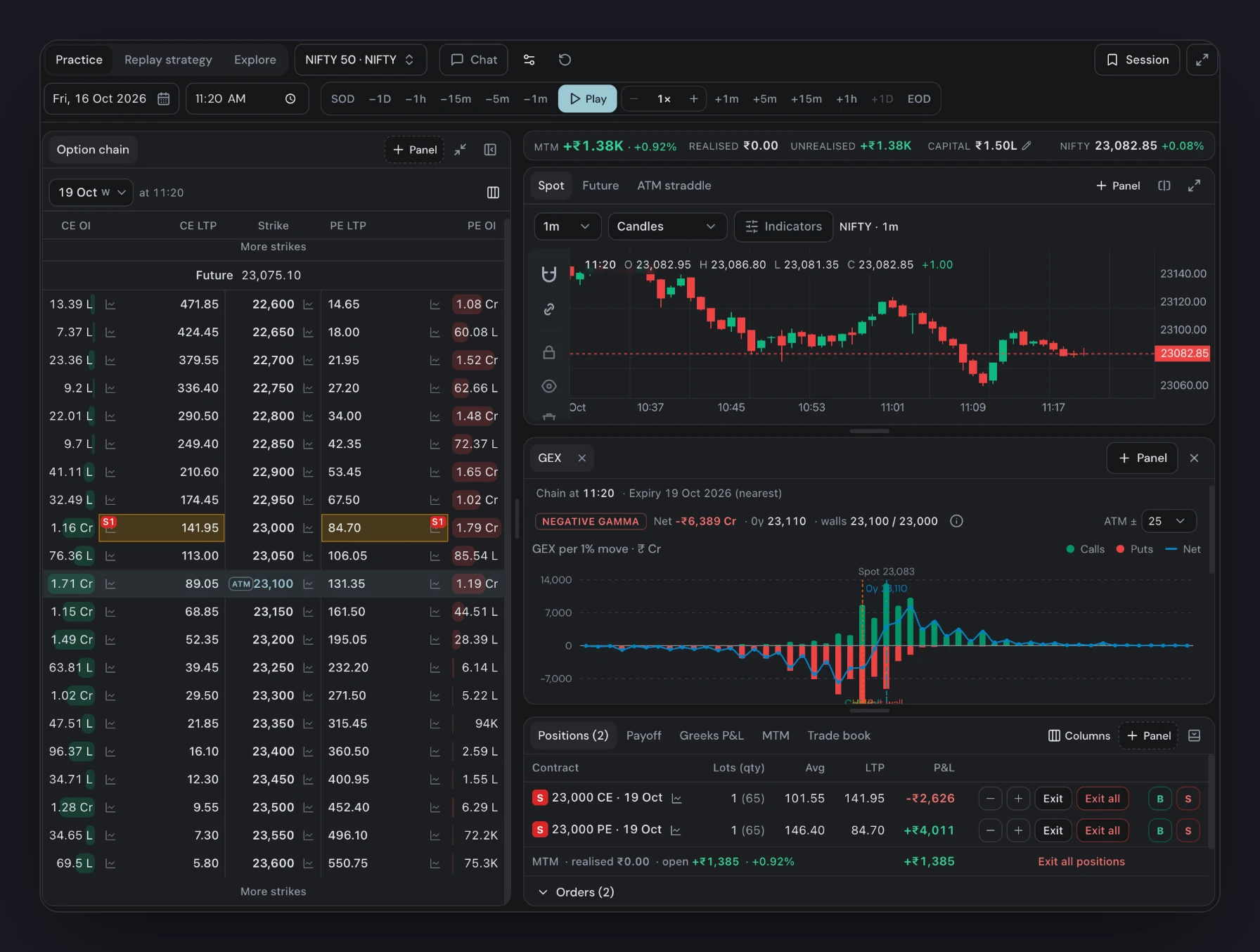
A NIFTY session at 11:20: the chain, the chart, GEX by strike and a short straddle up ₹1.38K.
The Simulator is in beta. It covers Indian indices and stocks, MCX commodities and crypto.
4. Market calendar
Every date that moves a trade, in one calendar: exchange holidays and special sessions, contract expiries, company results and corporate actions, RBI and FOMC meetings, and exchange policy changes.
- Clean by default. A holiday listed by NSE, BSE and MCX shows once, with each exchange's sessions spelled out. Expiries name their symbol, and a commodity's futures and options expiries are shown separately.
- Filter in one row. Choose event types, markets and symbols without leaving the calendar.
- Open to everyone. The calendar is public at app.volrix.ai/calendar, no sign-in needed. You can also ask about it in chat or through MCP.
Is the market open on Diwali this year, and which index expiries fall that week?
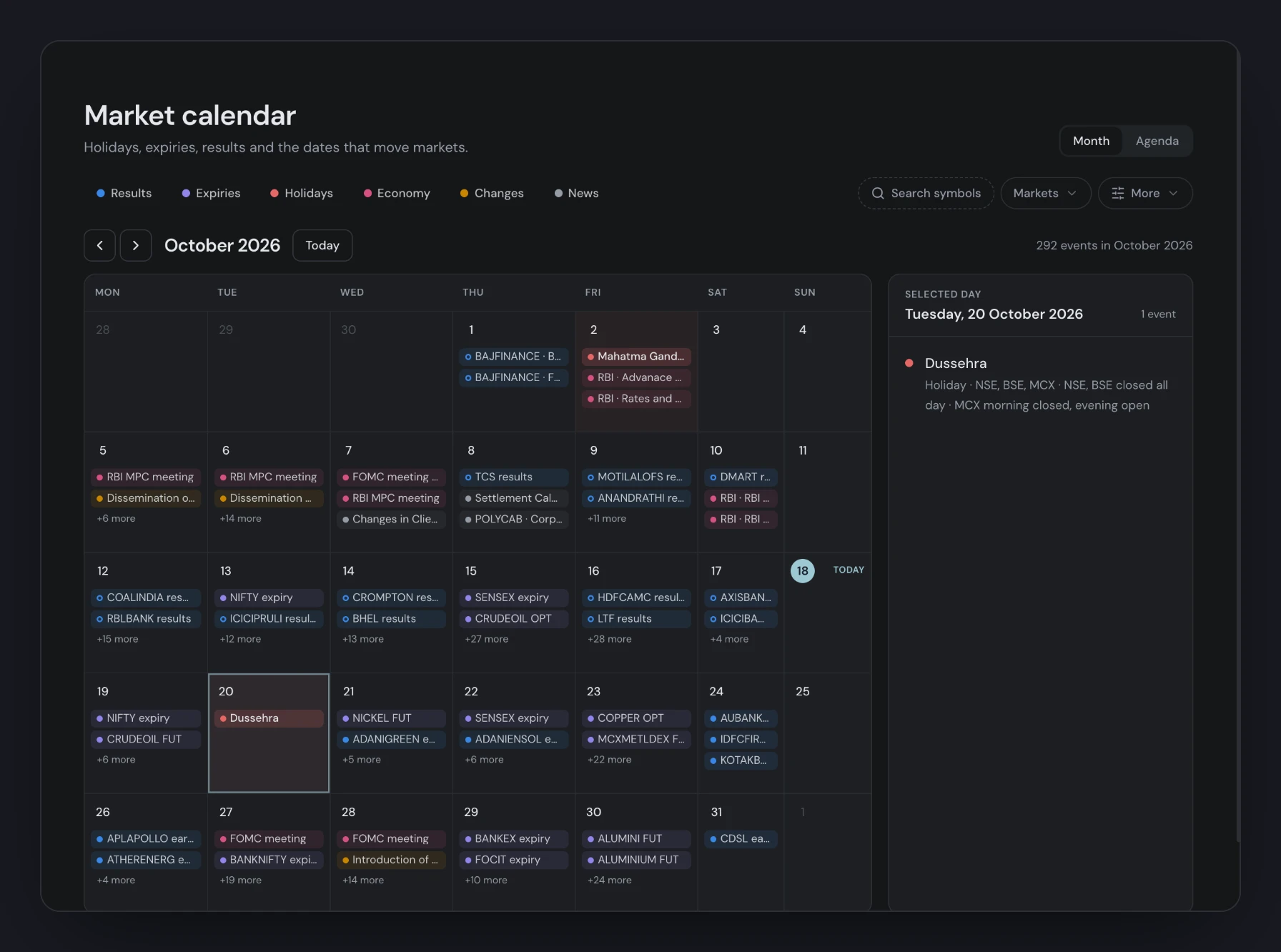
October at a glance. Dussehra shows once, with NSE, BSE and MCX sessions.
5. Tradebook backtests on real options and futures
Already have signals from TradingView or another platform? Upload the trade list as it is, and Volrix replays every trade on real contracts with historical prices.
- Upload as is. Attach a TradingView "List of trades" export (XLSX or CSV) in chat, or any CSV with entry and exit times and a direction. Volrix reads the columns for you.
- Trade each signal your way. Buy the ATM weekly call on long signals and the put on short ones, sell premium, or trade futures. Pick strikes by moneyness, premium or delta, weekly or monthly expiries, and your lot size.
- Add your rules. Stop loss, target, trailing stop, re-entry and waiting entries apply to every trade.
- Hold through expiry. For positional trades, automatic rollover carries an expiring futures or options position into the next contract while the signal is still open.
- Real fills, full audit. Fills come from historical market data, not the prices in your file. The report shows every signal: accepted, skipped, and why.
It works for NIFTY and other indices, MCX commodities, stock F&O, and Delta BTC and ETH.
Backtest this TradingView tradebook on NIFTY options: for every long signal buy 1 lot of the ATM weekly CE, for every short signal buy 1 lot of the ATM weekly PE, entering and exiting at each signal's times.
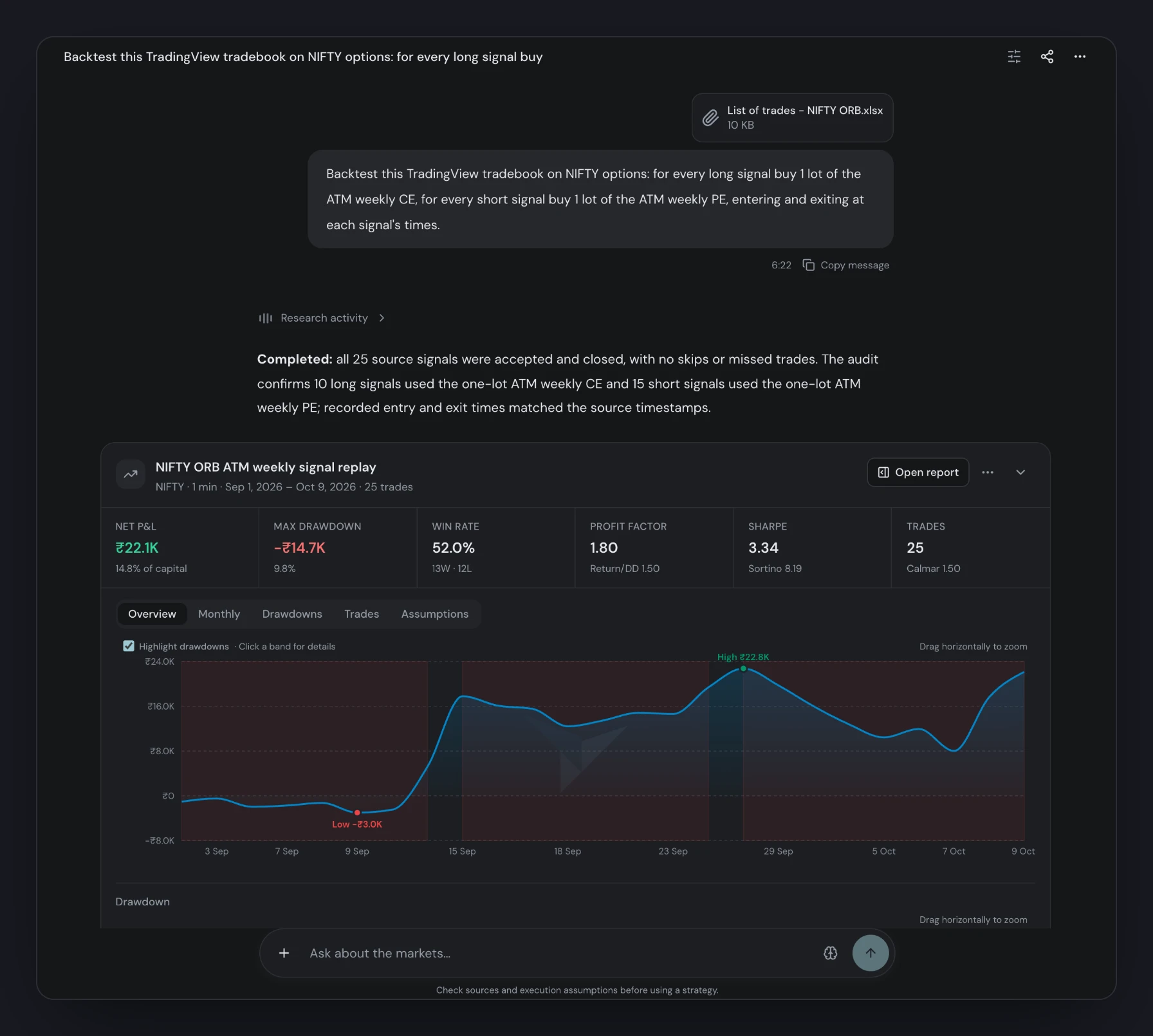
Attach the export and describe how to trade it. All 25 signals were accepted and replayed on NIFTY options.
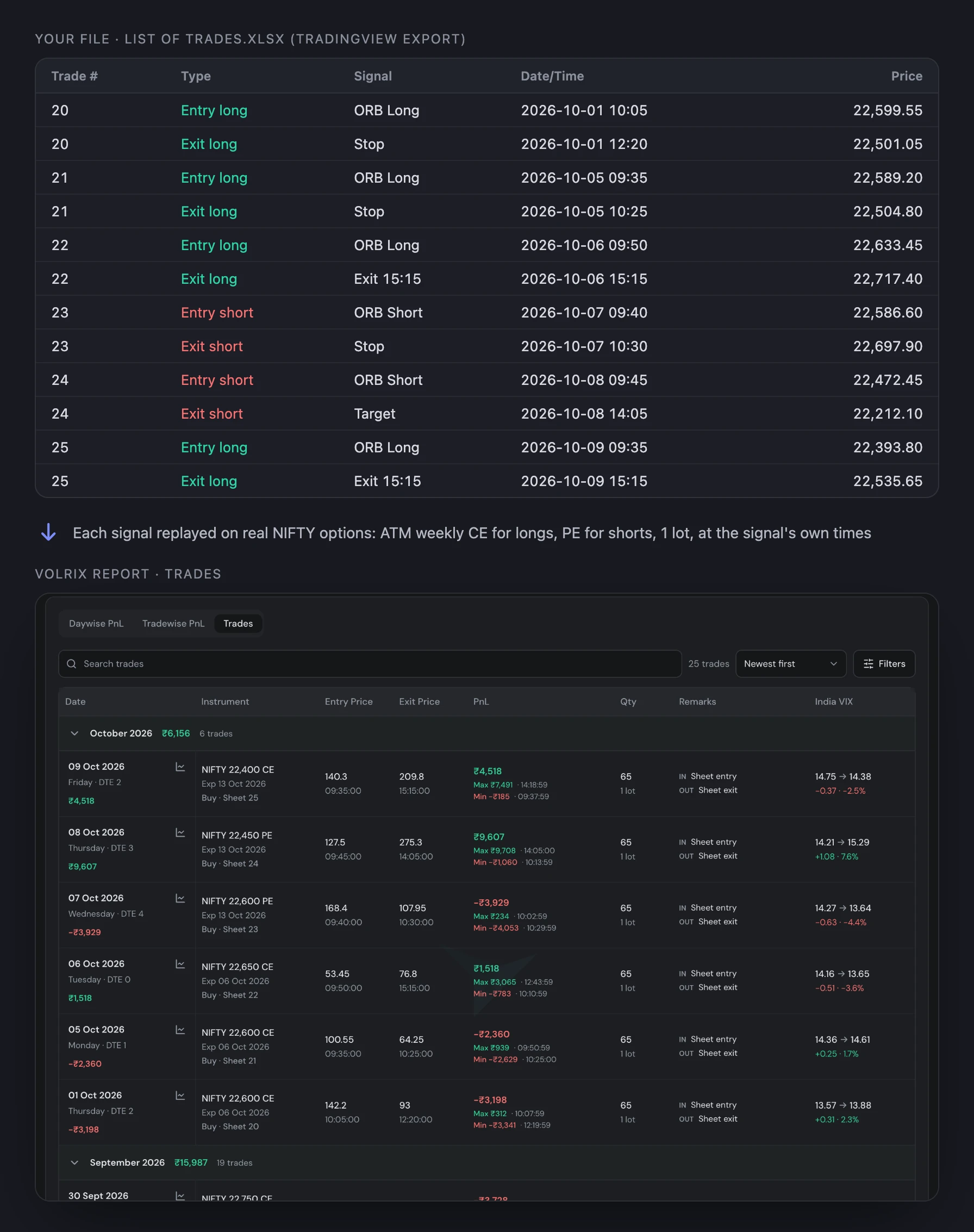
Each signal becomes a real option trade: the ATM strike at the signal time, its own expiry and DTE, entered and exited at the signal's times.
6. Lot multiplier in reports
See any backtest at 10 lots, 20 lots or more, without running it again. Open Report parameters → Adjust, set the Lot multiplier and apply.
Quantities, P&L and costs scale with it. Returns are measured on capital × multiplier, so ₹1.5 L at ×10 reports against ₹15 L. Downloaded PDFs and share links keep the multiplier too.
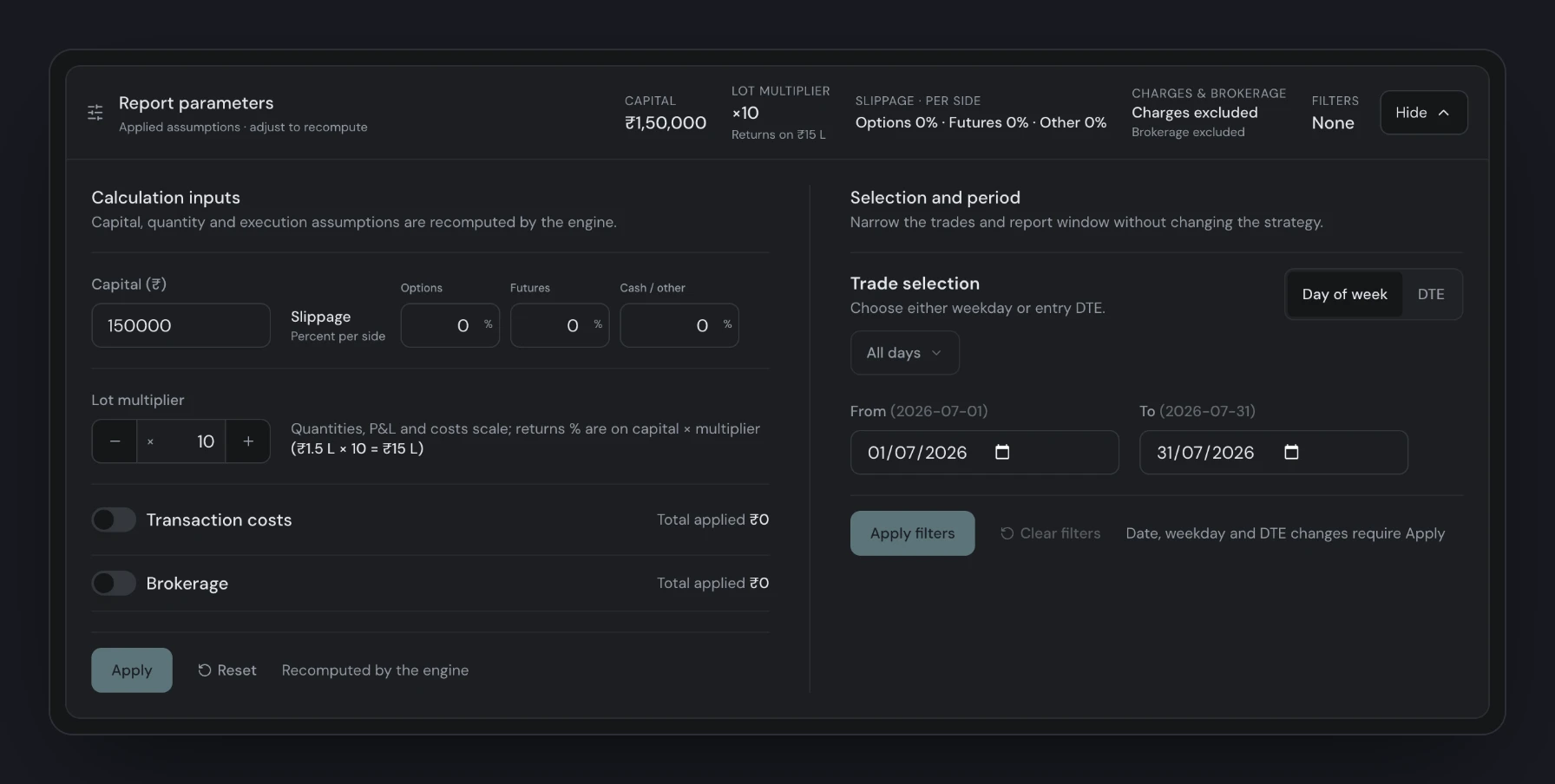
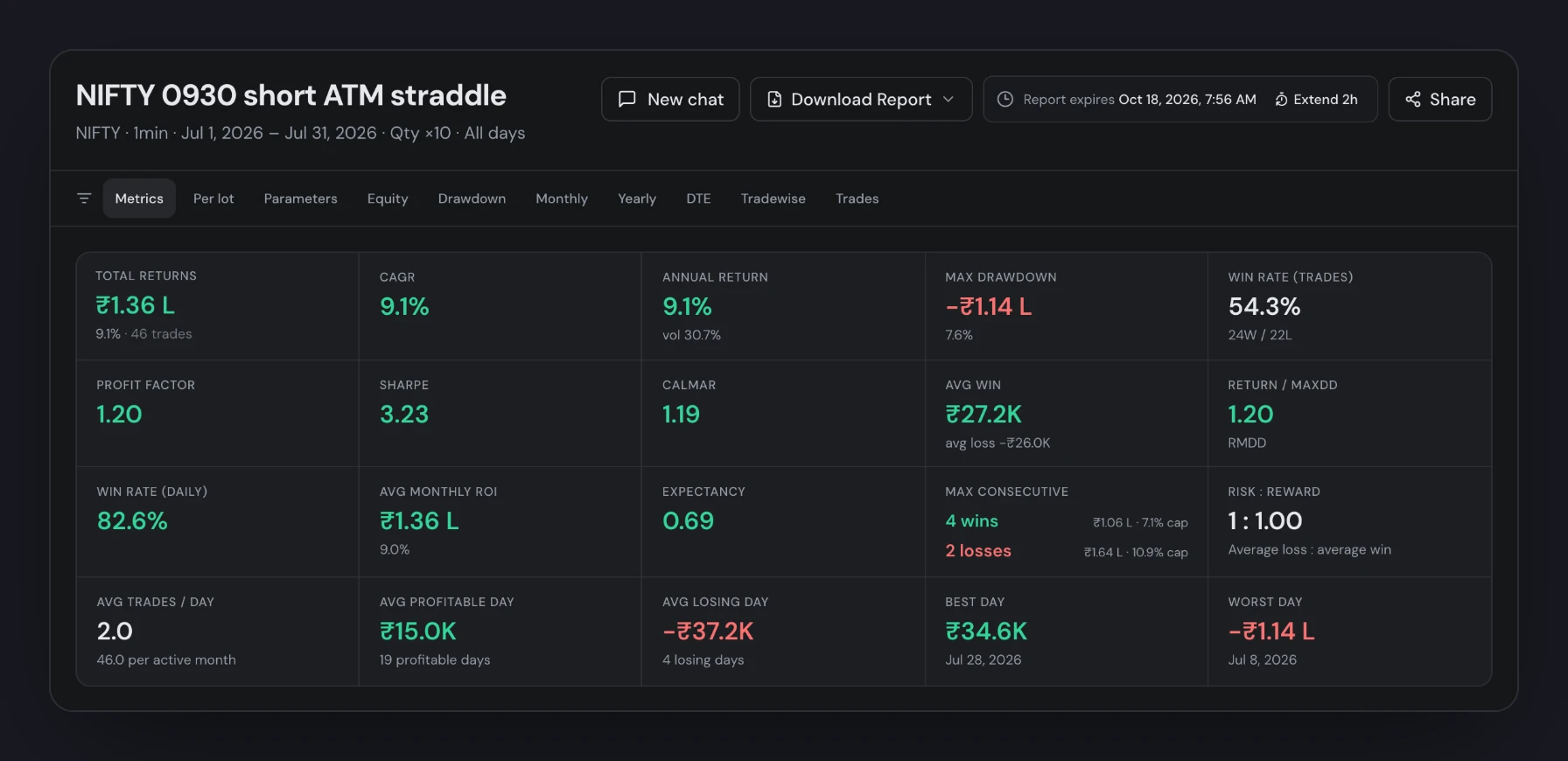
The same run at ×10: P&L and drawdown scale, while ratios such as Sharpe stay the same.
In chat, just ask:
Show this report at 10 lots.
7. DTE now follows the contract you trade
A trade's DTE is now its own contract's days to expiry. A NIFTY monthly option entered 19 sessions before its expiry shows DTE 19, even when the weekly expires in 4 sessions. The underlying's nearest expiry is kept as a separate field, nearestDTE.
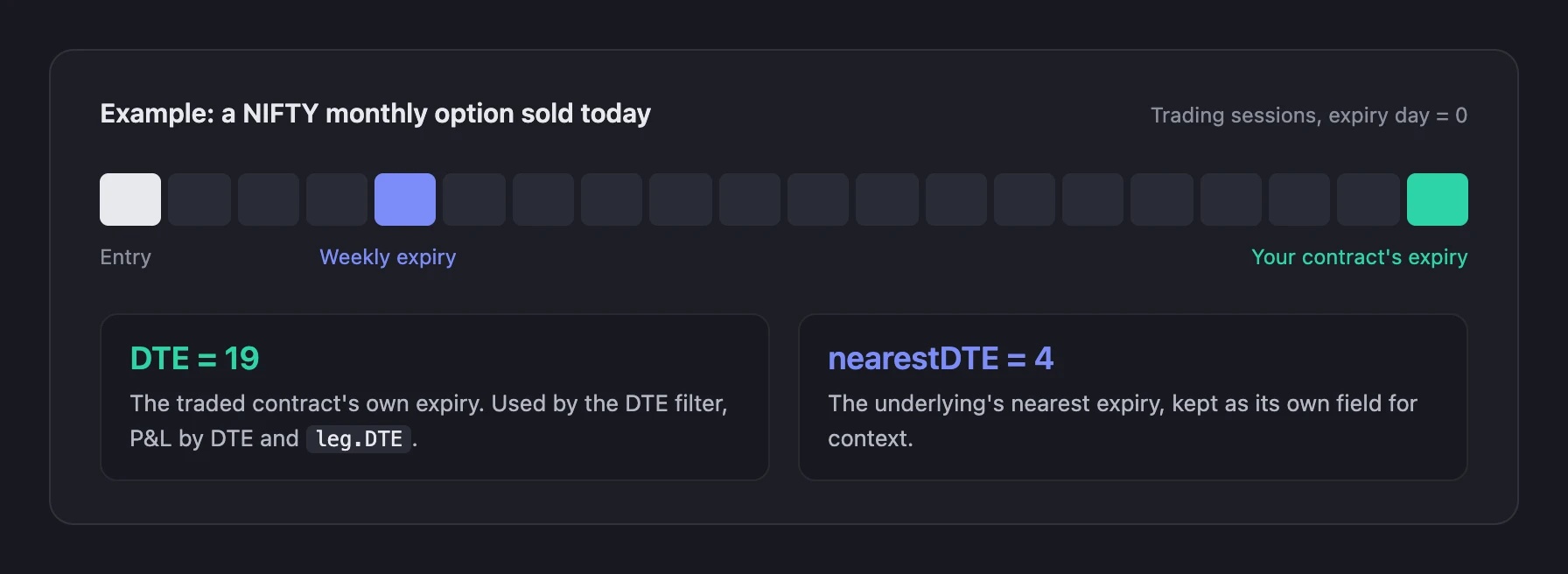
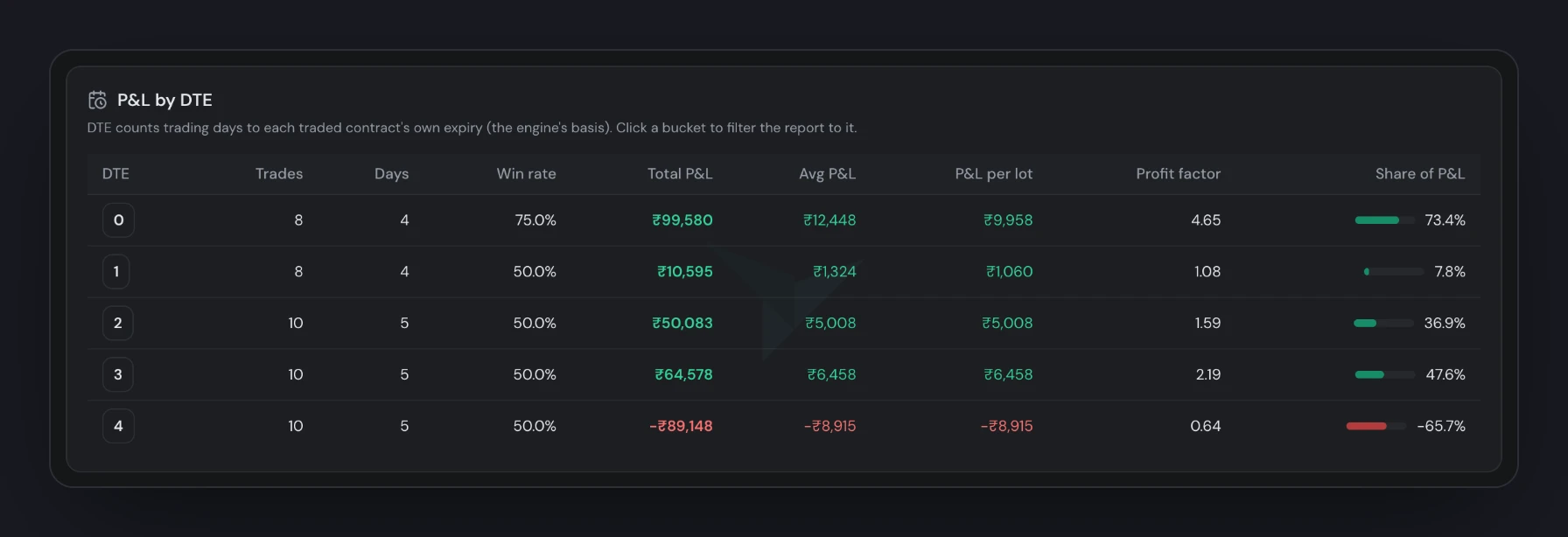
- What uses it: the report's DTE filter, P&L by DTE, and
leg.DTE/leg.entry_DTEinside strategies. Each follows the contract a leg actually holds. - How it counts: in trading sessions. Weekends and exchange holidays are skipped, special sessions count, and expiry day is 0. Delta options count calendar days.
- What stays the same: choosing which sessions to run on (expiry-relative trading days) still follows the underlying's nearest expiry.
- Older runs: backtests run before 18 October 2026 keep their stored values. Rerun one to see contract DTE.
8. Also new
- Sharper IV. Implied volatility is stored with finer precision from 17 October 2026, across every feed.
- Reports that last. A report's summary stays in your chat after the full report expires, and reruns stay in the same chat.
- Per-lot view. Reports add P&L per lot, best and worst day per lot, and P&L by DTE.
Open Volrix to try them. The Simulator and the calendar are in the sidebar.